How AI Changed The Way I Code

Overview
Leveraging AI as a software developer will allow you to write code more efficiently. In this article, my goal is to make so that you have a better understanding on how to use AI as a developer without becoming a slave to it.
Github Copilot
Github copilot allows for AI auto-completion directly inside your IDE. You can install Github Copilot directly into your favourite code editor, whether that be VSCode, any JebBrains products or Neovim.
The bigger the a codebase gets, the more helpful Github Copilot becomes. It has the ability to know what changes you made recently and a general overview of the entire codebase. I have used Github Copilot for over 6 months, and I have concluded that the ability of Github Copilot has improved significantly.
At times I find myself knowing what to do, but not knowing the exact syntax. If that occurs, I usually make a comment explaining what I am trying to do, and Copilot will usually suggest the right answer.
Here is an example. Let’s say that I want to chunk up an array into multiple arrays. It is really simple to do. Let’s see how we can leverage the capabilities of Github Copilot to do this. I will be using Python for demonstration purposes.
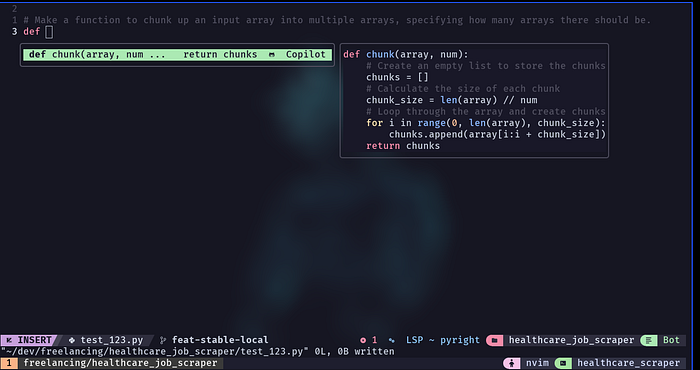
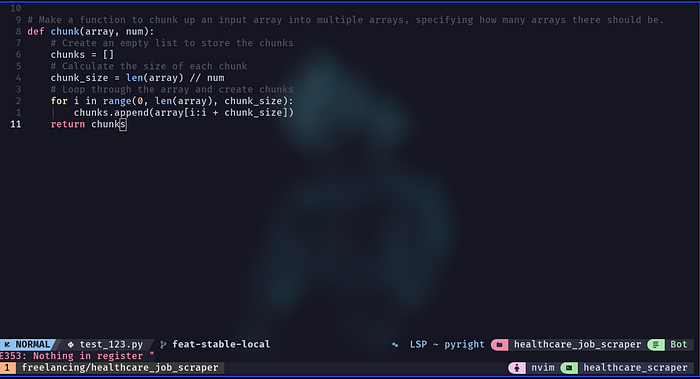
When I press TAB, here is the final result. It looks correct:
Here is a link to Github Copilot, if you aren’t using it already.
ChatGPT
I am using ChatGPT for over a year to help me as a developer. Here are the benefits I’ve experienced:
- Improved code quality
- Better understanding of complex topics
- Writing more complex code faster
In the past I’ve fallen into a trap, where I was copying and pasting things from ChatGPT to my IDE, without actually understanding how things work. If it didn’t work, I would copy and paste it back and prompt ChatGPT to “fix this code”. If it still didn’t work, I would repeat that cycle over and over. This has led to frustration and me not understanding how things work, which had a negative impact on my developer productivity.
For that reason, I stopped using ChatGPT altogether for around a month. That has allowed me to understand that ChatGPT should help you, but there is a balance. If you are going through this issue right now, I recommend going on a 1 month “ChatGPT detox”.
I think that you must still code and solve problems 80% of the time yourself, using ChatGPT around 20% of the time. At this moment, I find myself using ChatGPT on a daily basis, making sure I understand what is going on. Also, instead of copying the entire code block from ChatGPT, I only copy and replace the things that are necessary. This allows you to understand what went wrong and how to fix it.
Conclusion
In summary, use the capabilities of AI to make you a better developer, but don’t let it use you. You must still be independent. If you find yourself being a slave to AI, it might be best to detach from it entirely for a few weeks.
The developer who gets the biggest benefit from using AI is the developer who chooses to use it. I am at a stage where I can code without using AI. I choose to use it when needed to speed things up. That is how I think you should use AI tools as a developer as well.
If you liked this, read my article "Beginner to Full-Stack in 6 Months".